श्री राम रामेति रामेति, रमे रामे मनोरमे । सहस्रनाम तत्तुल्यं, रामनाम वरानने ॥
Get the Vyas Peeth App
One tap from your home screen, full screen, same login.
On iPhone or iPad: tap the Share button in Safari, then Add to Home Screen.

Home›B.Com and BBA›GCC Finance Operations

B.Com and BBA · Job Simulator

GCC Finance Operations Simulator

Procure to pay, order to cash and record to report for a US parent, the way a Hyderabad GCC does it.

3 Levels30 Case StudiesB.Com Year 3US GAAP · Amounts in US$6 Months Access

Hyderabad's GCCs hire thousands of commerce graduates each year for P2P, O2C and R2R teams. Interviewers ask about three-way matching, cash application and month-end close, which colleges rarely teach.

A simulator for the finance operations work done in global capability centres (GCCs). For a fictional US company with its finance centre in Hyderabad, you match invoices, run payments, apply customer cash, age receivables, accrue, reconcile and close the month in US dollars under US GAAP.

Who It Is For

  • B.Com Year 3, BBA and M.Com students aiming for GCC jobs
  • Freshers joining P2P, O2C or R2R teams
  • Anyone moving into shared services finance

Skills You Build

Three-Way MatchPayment RunsCash ApplicationAging and DSOAccrualsReconciliationsMonth-End Close
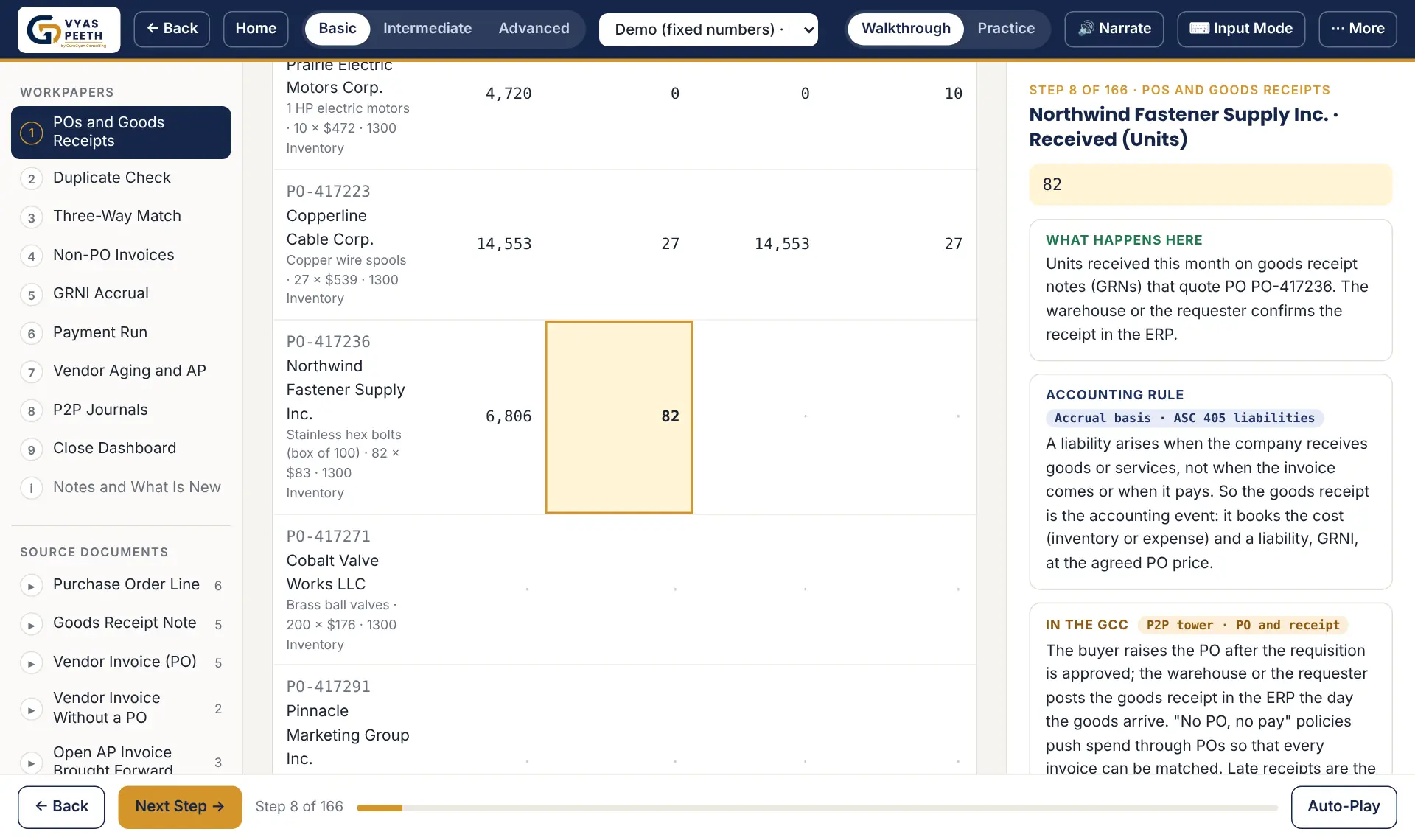
Sample screen
Sample screen

What You Learn

BasicProcure to Pay: purchase orders, goods receipts, three-way match with tolerances, duplicate checks, GRNI, the payment run with early-payment discounts and vendor aging.
IntermediateAdds Order to Cash: billing, cash application with discounts, deductions and short pays, customer aging, DSO, the bad-debt reserve and credit holds.
AdvancedAdds Record to Report: accruals and reversals, prepaids, fixed assets and depreciation, bank and intercompany reconciliations with currency, close journals, trial balance and account reconciliations.

What You Get

  • Software-Style Input Mode: Key every source record into data entry screens like professional software, clear the diagnostics, review and submit, then see every line that differs from the answer key and the input that caused it. Try it free.
  • Guided Walkthrough: Every number moves from its source document to its line, step by step, with the rule and the maths. Auto-Play and narration included.
  • Your Own Numbers: 10 case studies per level. Each student gets unique figures, and New Version gives fresh numbers whenever you want to practise again.
  • Practice Mode: Blank lines to fill in yourself. Check My Answers shows what matches and hints at the rest.
  • Answer Sheet: Every correct value with its working, grouped by form or workpaper.
  • Scope and Assumptions: Each form lists what is included, excluded and assumed, so you know exactly what you are learning.
  • Presenter Mode: Large, clean screens for classrooms and team sessions.
  • Certificate: Score 80% or more on all 10 cases of a level to earn a Vyas Peeth certificate with an ID employers can verify; add it to LinkedIn in one click.

Plans and Prices

Free Demo

₹0
  • One fixed-number case per level
  • Full guided walkthrough
Try the Demo

All Three LevelsBest Value

₹1,999 ₹1,499$18
Save ₹500
  • All three levels: 30 case studies
  • Walkthrough, practice, answer sheets and Input Mode
  • A certificate for each level you complete

Already enrolled? Log in, then open your level: Basic · Intermediate · Advanced.

Self-study course. Practise on your laptop, desktop, tablet or mobile. Live classes, video lectures and in-person coaching are not included and are charged separately: see Coaching Classes.

6 months of access. Secure Razorpay checkout: pay in Indian rupees, or in US dollars if you are outside India (choose at checkout).

Surya P Vyas
Designed by Your Mentor

Surya P Vyas

CA, EA, B.Com, PG DBM, Six Sigma & Pursuing ACCA · 25+ years in global tax, 10+ years in the US · Former Big 4 Tax and Transformation Leader who led teams of 600+ professionals.

DeloittePwCShellKPMGThomson Reuters

About Your Mentor → · What People Say →

FAQs

Why US dollars?

Most Hyderabad GCCs keep the books of a US parent. The simulator uses US GAAP terms and US dollars, with the rupee only for the intercompany part.

Is this an ERP?

No. It teaches what the ERP does and why, so you can work in any of them.

How do I subscribe?

Choose a plan above and press Buy Now. Enter your name, login email and WhatsApp, pay on Razorpay, then activate on the Thank You page with your Payment ID. Teams of 10+ can ask for a team licence.

What do I need?

A current browser (Chrome, Edge, Safari or Firefox) and internet. A laptop works best for simulators. One login, up to 2 of your own devices.

Are classes included?

No. This is a self-study course that you use on your laptop, desktop, tablet or mobile. Live classes, video lectures and in-person or classroom coaching are not included in the price; they can be arranged separately at an extra charge. See Coaching Classes or WhatsApp +91 81478 99500.

How long is access?

6 months from activation. Full refund within 7 days (bundles as a whole).

Request a Call Back

Not sure which plan suits you? Leave your number and a good time to call; we reply within one working day.

We use these details only to reply to you. See our Privacy Policy.

Questions? WhatsApp us or see the FAQs. What each form covers: Scope & Assumptions.

Start FreeSee Plans

Your Details

Pay in:

Self-study access (laptop, desktop, tablet or mobile) for 6 months; live, video or in-person classes are not included. Your login works on up to 2 of your own devices. By paying you agree to the Terms and Refund Policy.